
Check your Airtalk wireless check status fast with simple steps, status meanings, approval timelines, and online support help.
Quick Answer
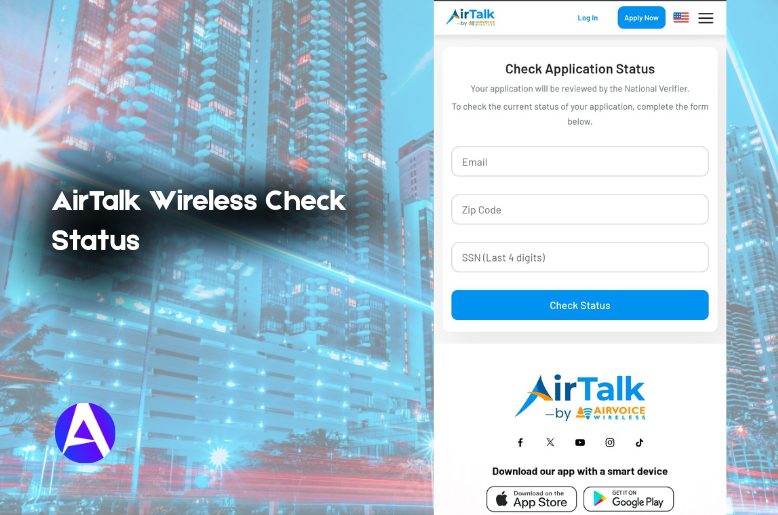
To check your AirTalk Wireless check status, visit the official status page, enter your email address, ZIP code, and the last 4 digits of your SSN, then click Check Status. This is the fastest way to see whether your AirTalk Wireless application is still pending, approved, rejected, or in the process of being shipped.
If you are waiting on a Lifeline phone, a SIM, or an order update, this guide will help you understand every status in plain English, without wasting your time.
How To Check Your AirTalk Wireless Status Online
The most trusted method to check your status is through the official AirTalk Wireless status check page.
Here’s how:
- Open the AirTalk Wireless Check Application Status page.
- Provide the email address that you used to submit your application.
- Provide your ZIP code.
- Provide the last four digits of your SSN.
- Select on Check Status.
- The status will be displayed to you on the screen.
This is the fastest method because it takes you directly to the application tracker. You will be spared the process of perusing through your account to track the status of your order. Although you can do that if you want to see the status of your order in more detail.
If you have an account, you can also log in and check My Account or Order Status. This gives you an additional option to check the status of your order, review your order history, and update your information.
Use AirTalk Wireless To Check Status On iPhone Or Android
Many users search for Airtalk Wireless Check Status iPhone or Airtalk Wireless Check Status Android because they are checking from a phone, not from a computer.
The process remains the same on both devices:
- Open the status page in your browser.
- Enter your application details.
- Tap on Check Status.
- You will then be able to review the latest update.
You can also download the AirTalk app on supported devices. This makes it easier to stay updated if you check it from your phone instead of opening the website.
The best tip for a mobile user is simple: keep the email you used for your application on hand. That one detail is usually the first thing people forget when they try to log in later.
What Does Each Status Mean On The AirTalk App?
This is where most confusion begins. While a status label may appear technical, the meaning is usually clear.
Completion
This indicates that your application has been completed and submitted to the National Verifier for confirmation.
In Progress
This indicates that your application is still under review.
AirTalk Wireless check status pending
If you see AirTalk Wireless check status pending, it generally means that the review is still pending. In a lot of instances, the system is still working on the verification of your details.
AirTalk notes that the approval will happen within 20 to 30 minutes; however, some applications take around 3 to 4 days, and in some rare cases, they can take longer if the documents need to be reviewed again.
AirTalk Wireless Application Status Approved
If you see AirTalk Wireless application status approved on your screen, that is the most desired status. It indicates that your application has been verified, and your order can now proceed.
Delivery
This indicates that your phone or other electronic device has shipped or is in the process of shipping. AirTalk states that you will receive an email and a text message to your phone with shipping information in advance.
Denied
If your status is denied, your application was not approved. This can happen for multiple reasons, including:
- Providing incorrect information
- Submitting ineligible documentation
- Reporting income that is above the threshold
- Providing incomplete verified information
If that is the case, ensure that you have reviewed your details, and contact support in case of any queries.
How Long Does It Take To Get Approved And Receive Shipping Notifications From AirTalk?
This is by far the most popular question.
Approval Time
AirTalk states that approval happens in about 20 to 30 minutes. However, it can take from three to four days and even more in some cases, if the review of the proof documents is needed.
Shipping Time
After approval, your order is processed to be shipped. According to AirTalk, customers receive their phones in about 7 to 10 business days following the approval. Typically, the email of shipping confirmation contains the tracking number.
If you’re receiving an iPhone through AirTalk, you may also want to learn how to enable iMessage so you can start using Apple’s messaging service immediately after setup.
What Causes Delays
Delays are frequent in cases where:
- An application needs to be reviewed
- Verification of documents is needed
- The information provided is not in alignment with the application
- Tracking information is not yet generated
- The page to check the status is not updated
The system is yet to update your case, even though there is nothing wrong.
Understanding The Entire Status Flow
The application goes from this entire process:
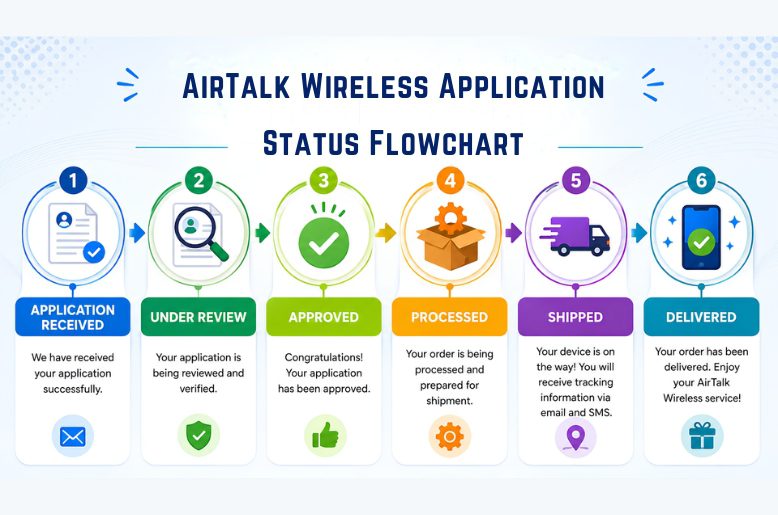
This is the common path to expect. If the progress gets stuck, it is most likely at the review or while verifying documents.
In these two cases, it is best to check your email and messages on AirTalk.
Look At Your SMS And Email
AirTalk sends you SMS and email notifications whenever there is a status update. This means you should pay as much attention to your email as you do to the status page.
This is the type of expected messages you should look for:
- Application verification
- Requests for more documents
- Approval messages
- Notifications of shipment
- Tracking messages
Don’t forget to check for updates in your spam or junk folder. Many people overlook updates and assume that there has been no activity.
If you can’t access your application updates because of email issues? Here’s how to change Gmail password on iPhone and regain access to important AirTalk notifications.
If you haven’t noticed any changes for several days, there is no need to presume your application has been denied. It is likely that your application is still in the queue.
Common Status Issues And How To Solve Them
Status pages can be helpful, but they also have the potential to be very frustrating. The most popular issues and their resolutions are listed below.
1. Unable to view the status page
The page may need to be refreshed or the browser cache cleared. You can also try accessing the page on a different device. Mobile browsers can also function differently than desktop browsers.
2. Status is stagnant
If there are still changes on the page within the typical processing time, you may need to be patient. If no change is reported after a week, feel free to reach out to customer support.
3. You provided inaccurate information
This occurs more frequently than people expect. If you can, log in to your account. If not, reach out to the customer support team to update the information.
4. Confirmation email missing
Confirm the email has not been sent to your spam, junk, or promotions email folders. If there is not an email in any of these folders, create a ticket with the support team at AirTalk.
5. Your order is still in the approval
If there is an order, it has not been shipped. There is no tracking information until the order has been approved and shipped.
6. Requested files not provided
If your account requests you to submit files, re-upload the files to the account. Each file should be legible and fully support the application request.
How To Contact AirTalk Wireless Customer Support
If you cannot resolve the issue on your own, AirTalk customer support can help.
By phone
AirTalk support numbers listed in the provided information include:
- +1 (206) 445-7825
- +1 (855) 478-6789
The customer service hours in the provided data are:
- Monday to Friday: 8:00 a.m. – 8:00 p.m. CST
- Saturday: 10:00 a.m. – 7:00 p.m. CST
By contact form
You can also visit the AirTalk website and use the Contact Us form. Choose your inquiry type, enter your information, and submit the request.
For quick help, phone support is usually the fastest option.
Why AirTalk Wireless is Popular Among Lifeline Users
Making the Lifeline program easier is what AirTalk is all about. With a smoother application process and a visible workflow status tracker, waiting for Lifeline application approval is less painful. No one enjoys the guessing game while waiting for an application to be approved.
User feedback informs the following:
Application process
The user experience is designed to be as simple as completing an online application, submitting the necessary documentation, and waiting for verification.
Status tracker
Users appreciate that they are able to independently check the status of their application.
Benefits
Monthly service for eligible customers includes:
- Un-enriched talk and text
- Un-enriched 5G+ high-speed data service, up to 30GB
Free Smartphones
Users are eligible for free smartphones from manufacturers, such as:
- iPhone
- Samsung
- Motorola
- And many more
Additional Devices
At no cost, AirTalk is also able to provide:
- Tablets
- Smartwatches
- Bundles
The user is permitted to carry their own device.
Complimentary International Calling
At no cost, eligible customers are able to make international calls to over 200 countries.
Complete Coverage
The Affordable Connectivity Program Coalition is designed to provide a reliable network throughout the entire nation.
Free service is provided as long as eligible customers use their service at least once in a 30-day period.
FAQs
Q. Why is my AirTalk status taking so long?
Some applications are approved quickly, while others take longer because documents need to be reconfirmed. Waiting a few days can still be normal.
Q. How long does shipping take after approval?
AirTalk says customers typically receive their device within 7 to 10 business days after approval.
Q. Can I check my status from my phone?
Yes. You can use Airtalk wireless check status through the iPhone as well as from the Android by using your browser or the app.
Q. What does pending mean?
AirTalk Wireless check status pending usually means the application is still under review.
Q. What should I do if my application was denied?
Review the reason, correct any mistakes, and contact support if you need help resubmitting or verifying documents.
Q. Can I use another method besides the status page?
Yes. You can check through your account, email, SMS messages, or support.
Q. What if I forgot my email?
Try the email address you used during the application. If that does not work, check your account or contact support for help.
Final Take
If you are checking the status of your AirTalk Wireless application, the quickest way is to visit the status page. The applicant logs in using their email, zip code, and the last four digits of their social security number. The AirTalk team encourages users to read the status update carefully, as the next steps become much easier once the update is reviewed.
For many users, AirTalk Wireless check status is less about reading a dashboard and more about getting peace of mind. This guide gives you that faster, with less confusion and a cleaner path to the answer.