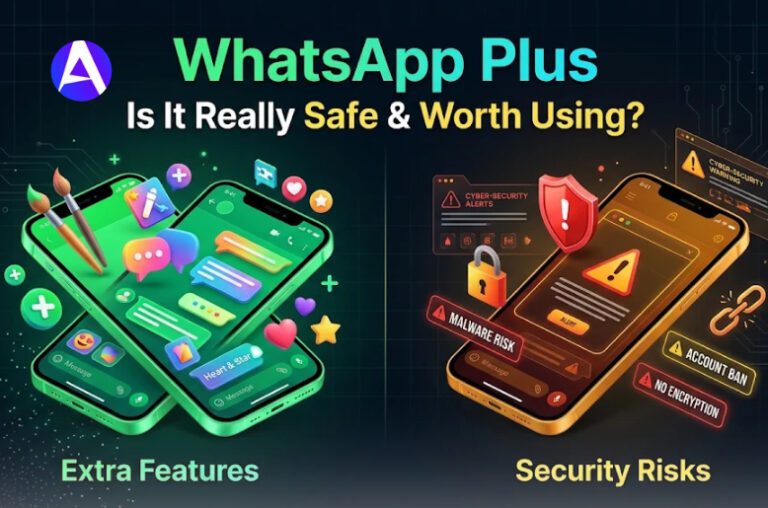
You may have heard of WhatsApp Plus software and wondered what it is and how it’s different from WhatsApp. The name may be misleading since WhatsApp Plus is not the same as any WhatsApp app released by Meta.
In general, WhatsApp Plus refers to an unofficial, modified version of WhatsApp that offers additional features and customization options. It includes some new themes, interface modifications, privacy settings, and other customization tools not found in the official app.
The above may look appealing because it gives you control over WhatsApp; however, it’s important to understand the difference between getting an app from the app store and getting an unofficial version.
Is WhatsApp Plus Official?
The answer depends entirely on which version you’re referring to. To begin with, the subscription version comes from Meta.
In your app, you can find it by going to Settings > Subscriptions > WhatsApp Plus.
It’s similar to a “deluxe skin” that you can unlock for an app that you already know and feel comfortable with, much like a video game that sells cosmetic upgrades that aren’t related to actual gameplay.
Second, the APK version of WhatsApp doesn’t come from Meta at all. It’s developed by third-party developers who modify the code for WhatsApp and use it without permission.
WhatsApp itself points out that unofficial applications are modified versions created by third-party developers that compromise users.
WhatsApp Plus vs. Official WhatsApp
Here’s an analogy that stuck with me: imagine buying a car from a licensed dealership, then letting your neighbor “upgrade“ the engine in his garage with parts he sourced online, no warranty, no inspection. It might run fine for a while. But if something breaks, no manufacturer has your back.
| Feature | Official WhatsApp Plus Subscription | Unofficial WhatsApp Plus APK |
| Built by | Meta | Unknown third-party developers |
| Where you get it | Inside the app’s own settings | Random APK download sites |
| Focus | Themes, icons, pinned chats, ringtones | Bypassing privacy features, hidden extras |
| Account safety | Fully within Terms of Service | High risk of permanent ban |
| Data handling | End-to-end encrypted, same as regular WhatsApp | Unverified, no guaranteed encryption standard |
That table answers half the questions people bring to this topic. Now let’s break down the features themselves.
What Features Does WhatsApp Plus Have?
Here’s the exciting part, at least as far as the authorized version goes. With the authenticated in-app version, you get:
- Unique animated stickers featuring special visual effects to add to one-on-one and group chats.
- Personalized themes and icons for the app that change the color of messages and backgrounds on your device.
- New options for pinned chats: you can now move up to 20 conversations to the pinned status instead of the regular limit of 5.
- Exclusive ringtones you can assign to certain contacts to know who is calling even without looking at your screen.
- The choice of customizing your chat groups with different themes in the notification alert sound.
- Consider it similar to doing interior design for your apartment without changing the water pipes. In other words, it’s cosmetic and optional.
The unofficial APK version of the app promotes a different feature set:
hiding your online status, silently turning off read receipts, and increasing media sharing limits. Such changes eliminate all privacy markers WhatsApp aimed to create for the sake of its users.
WhatsApp Plus Software Free Download: Should You Do It?
This search concerns me the most. It stems from those who are keen to receive extra functions for free but have no intention to read the terms and conditions.
The truth is that WhatsApp Plus software free download found on random pages of blogs and sites with file sharing is not actually free. You entrust a stranger’s code with your messages, contacts, and media.
I made a similar mistake some years ago with another altered messaging application. Within a week, my contacts who had never had my phone number started receiving spam from my account. It might have been merely a coincidence.
However, it has made me more cautious about installing anything outside official app stores.
Is WhatsApp Plus Safe to Download?
This is the main issue that must be addressed here. The above-mentioned subscription service can be trusted, as it works on the infrastructure developed by Meta itself.
It offers the same level of safety as the regular version of WhatsApp, and it operates in the same manner as any other application billed via Google Play or the App Store. However, an unofficial APK is a risky choice.
These applications do not pass through any official stores, and thus no one can vet them in advance before downloading them to a mobile device. Security experts say that it feels like leaving the door of your flat open.
The application seems to be like WhatsApp, but the developer has full control over what is going on with the user’s data.
Security and Privacy Risks
When you are uncertain, no assistance is offered to make the correct decision. The unofficial APKs of WhatsApp Plus usually bring forward:
- Viruses and spyware: since no app store reviews the file, harmful code can enter your system.
- Unverified data treatment of your chats, media, and contacts might not benefit from the same level of security.
- Inadvertently missed safety updates: there is a chance of running obsolete applications with loopholes long after WhatsApp updated them.
- No official backup: if something goes wrong and something damages the account, no one official will answer the phone.
If you are reviewing your account after installing an unofficial app, it is also worth checking your privacy controls. Our guide explains how to protect your account and manage privacy settings.
Can WhatsApp Plus Get Your Account Banned?
It’s true, and people seem to ignore this fact all the time. Using a modified, unofficial version of WhatsApp is against the platform’s Terms of Service. WhatsApp actively looks for these modified versions and bans accounts that have been caught using them for good.
To put it simply, WhatsApp will wipe out every chat, contact, and picture shared through the app once the account is banned. I’ve seen instances of people losing years’ worth of conversations with family members abroad because of this. That is far worse than losing a couple of custom stickers.
Is WhatsApp Plus Available for iPhone?
Generally, no, not in the unofficial APK sense. Apple’s closed ecosystem makes sideloading modified apps much harder than on Android.
The official, in-app WhatsApp Plus subscription is gradually rolling out and should eventually reach iPhone through the App Store, though timing varies by region and account.
What to Do If You Have Installed WhatsApp Plus
Don’t worry if you’re someone who has installed a modified version before the issue of official versus unofficial apps arose. If this is the case, follow these instructions:
- Remove the unofficial app from your phone.
- Download the real WhatsApp from the Google Play Store/App Store.
- Reset your password and check your connected devices by going to Settings > Connected Devices.
- Monitor your account for suspicious activity for a few weeks.
Secure Alternatives for Customizing WhatsApp
Want to customize with cool features like themes, ringtones, and stickers? Find out if you can get WhatsApp Plus or if it still hasn’t reached its users. This way, you can have fun while avoiding any potential risks.
However, you might also find that using WhatsApp’s settings will allow you to modify the look of your app without taking any chances.
If you use Apple devices, iMessage is another official messaging option with end-to-end encryption, although it is designed for communication within the Apple ecosystem.
FAQs
Q. What is WhatsApp Plus for?
WhatsApp Plus in its official form can be used for adding personalized options, such as interesting graphics or some pinned messages, thanks to the paid subscription service offered by Meta.
However, one might also opt for the unofficial version of WhatsApp Plus in order to avoid some of the annoying privacy features included in the ordinary version. The unofficial way, however, poses a lot of risks.
Q. Is WhatsApp Plus paid?
An official subscription will cost a user just a few dollars a month (about $2.99). The unofficial producers of WhatsApp Plus claim they offer their version for free, which is likely to cost the user much more in terms of possible dangers connected with the usage of this app.
Q. Are my chats going to be deleted after the switch to the original version of WhatsApp?
The answer is “No.” However, prior to uninstalling the modded version, a user should make sure to create a backup of all the chats via the default backup tool offered by WhatsApp.
Final Thoughts
However, looking back on that moment with my friend in the coffee shop, I understand why the extra features seemed attractive. Personalization is appealing, and most of us have our exchanges on WhatsApp.
However, as I reflected on the topic, it was clear to me then that the safest route toward personalizing WhatsApp is via the version created and backed by Meta. Consider the convenience vs. privacy and your years of chats, and you will note that the choice is usually straightforward.
Additional Resources
- WhatsApp Help Center, Unofficial Apps: WhatsApp’s own guidance on why modified apps violate their Terms of Service
- Google Play Protect: How Google screens apps for malware before they reach your device.
- WhatsApp Security & Encryption Overview: Details on how official end-to-end encryption works.